n8n development: workflows you can host and read

n8n is a workflow automation tool. You build workflows from nodes on a canvas, start them from webhooks, schedules or app events, and drop into code when a node is not enough. You can use n8n Cloud or host it yourself. We set it up, build the workflows and the code around them, and leave them documented.
n8n
  • Self-hosted n8n or n8n Cloud, chosen for your case
  • Webhook and schedule triggers, with Code nodes where needed
  • Error workflows that alert your team when a run fails
  • Workflows that call your own APIs and databases

When n8n is the right choice

n8n suits teams that want control over where their workflows run:

  • You want to self-host on your own infrastructure, on-premises or in a private cloud, for example to keep data close to your other systems.
  • Your workflow needs real code. The Code node runs JavaScript or Python, and a self-hosted instance can import npm modules.
  • The workflow is part of a larger system. n8n can call your API endpoints and you can keep heavy logic, such as SQL, in your own code.
  • You want AI steps beside ordinary ones. n8n connects to several model providers and gives agents tools and memory.

When n8n is not the right choice

Check these before you commit:

  • Nobody will run the server. n8n's docs say self-hosting needs technical expertise for installation and configuration. n8n Cloud removes that, but limits customization to the options n8n offers.
  • You need external npm modules on n8n Cloud. The Code node there cannot import them.
  • You plan to offer n8n itself to others as a paid service. The Sustainable Use License limits use to your own internal business purposes or non-commercial or personal use, so read the license first.
  • The task is a simple link between two popular apps. A hosted tool such as Zapier or Make may be quicker to set up and hand over.

What we have built with n8n

Projects we have delivered, described without client names.

Self-hosted n8n

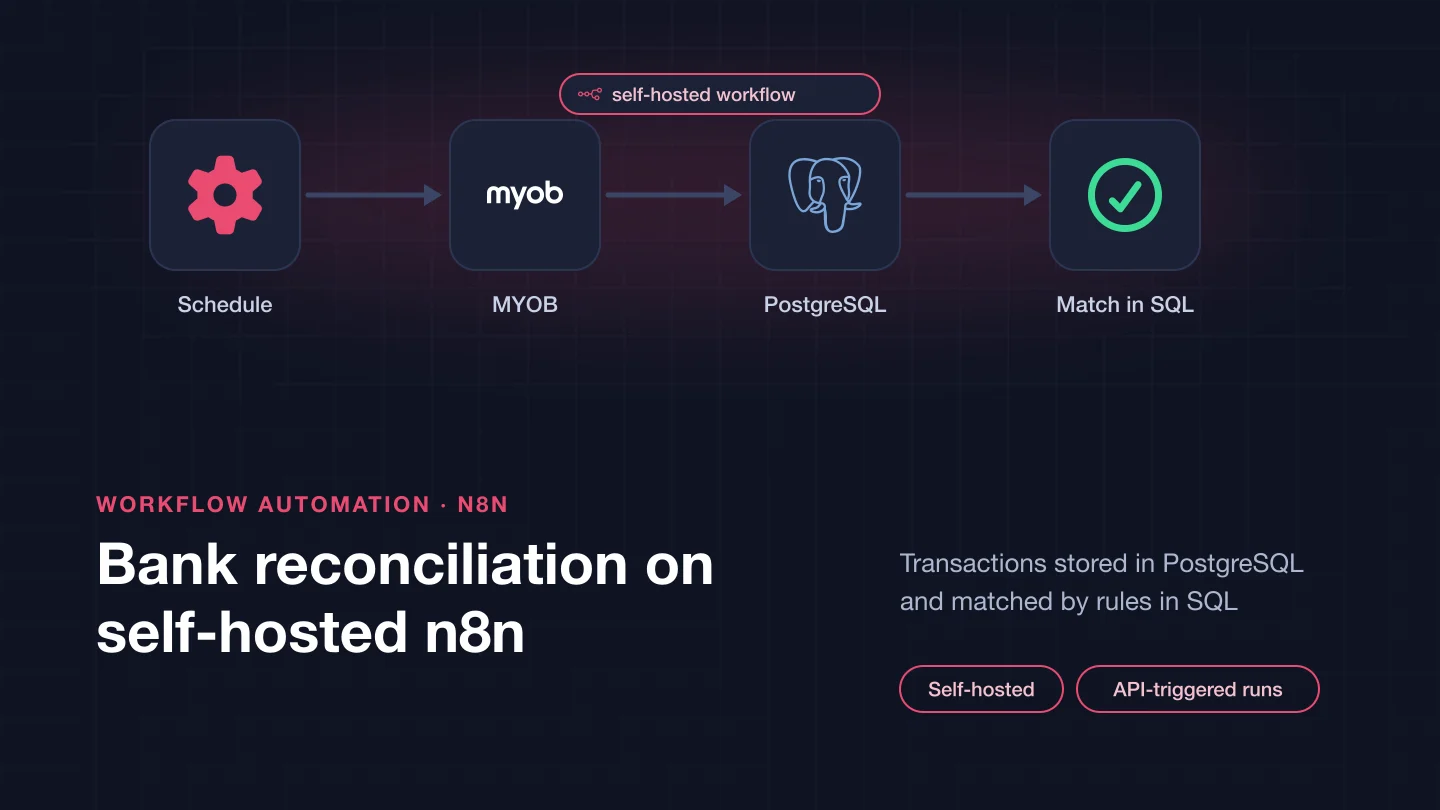
n8n set up on the client's own hosting for an accounting workflow, with a hosting platform recommended for it.

Bank transactions from MYOB

Transactions extracted from MYOB and stored in PostgreSQL, ready for matching.

A second source through its API

Records read from a Halo data source through its API, with SQL Server behind it.

Reconciliation matching in SQL

The matching rules written in SQL, so they can be read and tested outside the workflow.

Workflows that run the job

n8n workflows that orchestrate the reconciliation and call an API endpoint in our code to start each run.

Alerts in Microsoft Teams

Notifications posted to Microsoft Teams, so the team sees each run without opening n8n.

How n8n works

A workflow is a set of nodes connected on a canvas. A trigger node starts it. The Webhook node gives you a test URL for building and a production URL that registers when you publish the workflow. It supports basic, header and JWT authentication and an IP allowlist, and it can respond immediately, when the last node finishes or through a Respond to Webhook node. The Schedule Trigger runs on intervals or a cron expression, in the workflow's timezone. Each run is an execution, and you can see executions per workflow or across all of them. Credentials hold the login details for the services you connect, and you can restrict which domains a credential may be sent to. The Code node runs JavaScript or Python, once for all items or once per item. It cannot make HTTP requests or touch the file system, so the HTTP Request and file nodes do that. We have also connected n8n to an eCommerce store's marketing tools.

Not sure which tool fits? See how we choose between Zapier, Make, n8n and custom code.

What an n8n setup needs beyond the workflows

  • Error workflows: an error workflow starts with the Error Trigger and runs when an execution fails. One can serve many workflows. It receives the execution ID, the error message and the last node that ran. A Stop and Error node can fail a run on purpose when your own checks fail.
  • Node settings: Retry On Fail reruns a node that fails, and On Error lets a node stop the workflow, continue or send the error down a separate output. We choose these per node instead of leaving defaults.
  • Scaling: in queue mode the main instance handles timers and webhooks and creates executions, Redis queues them and workers run them. Workers need the database and the main instance's encryption key. Queue mode is not supported on SQLite. Separate webhook processors can sit behind a load balancer for heavy webhook traffic.
  • The license: n8n's Sustainable Use License allows use or modification for your own internal business purposes or for non-commercial or personal use. It allows distribution only free of charge for non-commercial purposes. Files marked as enterprise need an n8n Enterprise license.
  • Ownership: the server, the credentials and the workflows belong to you, with the workflow logic documented.

How we work

  1. Choose where it runs: n8n Cloud or self-hosted, based on who will run the server and what the Code node needs
  2. Keep heavy logic in code: SQL and business rules live in your own code and database, and n8n orchestrates
  3. Add error handling from the start: an error workflow, retry settings per node and an alert to the people who fix things
  4. Hand over properly: the hosting, credentials and workflows documented, with notes on reading a failed execution

Frequently asked questions

Should we self-host n8n or use n8n Cloud?

Self-host if you need full control over deployment and configuration and someone can run the server. Choose n8n Cloud if you want n8n to handle hosting, updates and scaling and you can work within its options, such as no external npm modules in the Code node.

Can n8n run our own code?

Yes. The Code node runs JavaScript or Python. On a self-hosted instance you can import npm modules. For larger logic we often put it behind an API endpoint in your code and have n8n call it.

What happens when a workflow fails?

If you assign an error workflow, n8n runs it with details of the failed execution, such as the error message and the last node that ran. That workflow can send an alert to email, Slack or Microsoft Teams. Nodes can also retry on failure.

Can we use n8n to run workflows for our own clients?

Read the Sustainable Use License first. It allows use for your own internal business purposes or for non-commercial or personal use, and it allows distribution only free of charge for non-commercial purposes. If your plan goes beyond that, check with n8n before you build on it.

How can we work together?

There are three ways, on the same terms:

  • Dedicated team, best for ongoing work: interview the developers, then they work on your project full or part time.
  • Fixed scope, best when requirements are clear: we agree the scope and the price up front, and deliver against it.
  • Time and material, best when the scope will change: you pay for the time used and can change priorities as the work goes on.

Whichever you choose, we sign an NDA before work starts, you own the code we write, and every change is reviewed in your repository.

Can I interview the developers before we start?

Yes. For a dedicated team you meet the developers in an online call and interview them before they join your project.

Planning an n8n workflow?

Tell us which systems it connects, where it should run and who will look after it. We will say whether n8n fits and what the build involves.

Tell us about your project

Tell us what you need built, fixed or improved. We come back with questions, a suggested approach and an estimate.
