MCP server development for your product and data

The Model Context Protocol (MCP) is an open-source standard for connecting AI applications to external systems. An MCP server lets AI assistants and coding tools use your product: look up data, run actions and fetch context. We build the server and the parts that make it safe to open up: narrow tools, sign-in with user consent, rate limits and an audit trail.
Model Context Protocol
  • Tools, resources and prompts designed for your product
  • Local servers over stdio or remote servers over Streamable HTTP
  • OAuth 2.1 sign-in with user consent, as the spec describes
  • Narrow scopes, input checks, rate limits and audit logs

When an MCP server is the right choice

An MCP server suits products that people want to use from their AI tools:

  • Your users want to reach your product from AI assistants such as Claude or ChatGPT, or from coding tools such as Visual Studio Code or Cursor. The MCP documentation lists these among the clients that support it.
  • You want one server that many MCP clients can connect to, rather than a separate plugin for each assistant.
  • The model should decide when to look something up. MCP tools are designed to be model-controlled.
  • You want to offer reusable prompt templates, such as slash commands, or context such as files and schemas, alongside the tools.

When an MCP server is not the right choice

MCP adds a protocol and a security surface. Skip it when you do not need them:

  • Only your own app or partners' code call your back end. A plain REST API with good documentation is enough.
  • You are building the AI application yourself and need a few functions. Define them as tools in your own agent code instead.
  • An action is costly or cannot be undone. The spec says there should always be a human able to deny a tool call, so keep such actions behind your own screens or require confirmation.
  • You do not yet have an API or a permission model. Build those first. The MCP server sits on top of them and should not bypass them.

What we build with MCP

Typical projects, described in general terms.

Tools for your product

A small set of narrow, mostly read-only tools, with clear input schemas and results formatted for models.

Resources and prompts

Context the client can attach, identified by URI, and prompt templates users pick, such as slash commands.

Remote servers

A Streamable HTTP endpoint on its own hostname, with each request handled independently so it scales out.

Local servers

Servers that a coding tool launches over stdio, with credentials read from the environment.

Sign-in and consent

OAuth 2.1 with your platform as the authorization server, a consent screen and a connected-apps list with revoke. Scoped API keys for scripts.

Safeguards and audit

Rate limits, input validation, protection against duplicate work and an audit trail of every tool call.

What an MCP server exposes

The spec defines three server features. Tools are functions the model can choose to call, each with a name, a description and a JSON Schema for its inputs. A tool can also declare an output schema and return structured results. Resources are data identified by a URI, such as files or database schemas, and the client application decides how to use them. Prompts are templates that the user picks, often as slash commands.

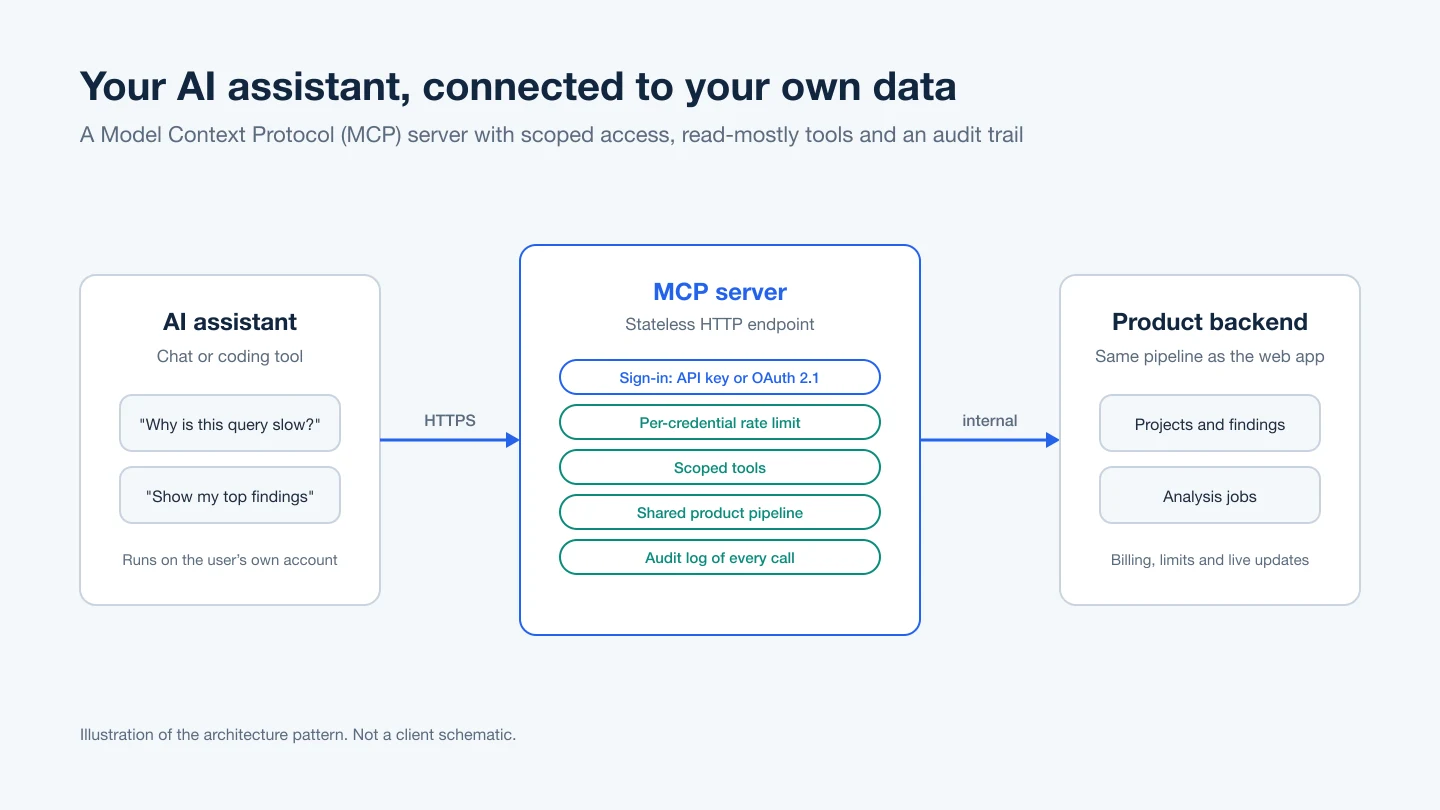
There are two standard transports. With stdio, the client launches the server as a subprocess and they exchange newline-delimited JSON-RPC messages; the server may log to stderr but must write only MCP messages to stdout. With Streamable HTTP, the server exposes one HTTP endpoint and the client sends each message as its own POST, answered with a single JSON object or a stream scoped to that request. The current spec describes MCP as stateless: each request carries what the server needs, and state that spans requests is passed as an explicit identifier. Earlier revisions allowed server-assigned sessions, so a server may need to handle older clients too.

Our own production MCP server, for a database-performance SaaS, runs on its own hostname as a stateless HTTP endpoint with no session store. It uses the same analysis pipeline, rate limits and billing as the web app, and it handles long-running analyses and repeated requests so an assistant does not cause duplicate work or charges.

Authorization and security, as the spec sets out

  • OAuth 2.1 for HTTP: the authorization part of the spec is based on OAuth 2.1 and applies to HTTP transports. A stdio server should take credentials from the environment instead.
  • The server's role: a protected MCP server is an OAuth resource server. It must publish Protected Resource Metadata that names its authorization server and return 401 with a WWW-Authenticate header when a token is missing.
  • Token handling: tokens go in the Authorization header on every request, never in the query string. The server must check that each token was issued for it, and it must not pass a client's token through to other APIs.
  • Confused deputy: a server that proxies a third-party API with one static client ID must get the user's consent for each client before forwarding them to the third party's sign-in.
  • Scopes: the security guide recommends a small starting set of low-risk scopes, with more requested only when a privileged action is first attempted.
  • Tool safety: servers must validate inputs, apply access controls, rate-limit tool calls and sanitize outputs. A state identifier passed as an argument is not proof of who the caller is.
  • Local HTTP servers: validate the Origin header and bind to localhost to block DNS rebinding.

In our production server, two sign-in routes resolve to one identity: scoped API keys for coding tools and scripts, and OAuth 2.1 for chat assistants, with the platform as the authorization server.

How we work

  1. Decide what the assistant may do: a short list of tools, read-only first, and which actions need a person to confirm
  2. Choose the transport and sign-in: stdio for local tools, Streamable HTTP for a hosted server, and OAuth or scoped keys to match your users
  3. Build on your existing back end: the same permissions, rate limits and billing as your app, with protection against repeated calls
  4. Test with real clients and hand over: tested with the assistants your users have, with the audit trail, scopes and revoke flow documented

Articles

Guides from our team on the questions buyers ask about this service.

All articles

Frequently asked questions

Do we need an MCP server, or is our REST API enough?

If only your own code or partners' code calls your back end, a REST API is enough. An MCP server helps when you want AI assistants and coding tools to discover and call your product's features themselves.

Should our MCP server run locally or as a hosted service?

A local server runs over stdio. The client starts it as a subprocess and it reads credentials from the environment, which suits developer tools. A hosted server uses Streamable HTTP on one endpoint and should use the spec's OAuth-based authorization.

How do users sign in to an MCP server?

For HTTP servers, the spec builds on OAuth 2.1. The server publishes metadata that points to its authorization server, and the user approves access in the browser. We also offer scoped API keys for scripts and coding tools, tied to the same user identity.

Can an AI assistant change data without the user knowing?

The spec says a human should always be able to deny a tool call, and clients should ask for confirmation on sensitive operations. On the server side we keep write actions few and narrow, check permissions on every call and log each one.

How can we work together?

There are three ways, on the same terms:

  • Dedicated team, best for ongoing work: interview the developers, then they work on your project full or part time.
  • Fixed scope, best when requirements are clear: we agree the scope and the price up front, and deliver against it.
  • Time and material, best when the scope will change: you pay for the time used and can change priorities as the work goes on.

Whichever you choose, we sign an NDA before work starts, you own the code we write, and every change is reviewed in your repository.

Can I interview the developers before we start?

Yes. For a dedicated team you meet the developers in an online call and interview them before they join your project.

Opening your product to AI assistants?

Tell us what users should be able to ask for, who they are and how they sign in today. We will say whether an MCP server fits and what it should and should not do.

Tell us about your project

Tell us what you need built, fixed or improved. We come back with questions, a suggested approach and an estimate.